.svg)
%2520(1).avif)
Why Schema is the native language of AI
AI models like Google Gemini, Perplexity, Grok, or ChatGPT do not read text sequentially like a human. They parse data to build a "Knowledge Graph." When an AI scans your Webflow site, it is trying to answer: What is this page about? Is this a product? A tutorial? A person?
The ambiguity problem
If you have a heading that says "Fastest Integration," the AI has to guess what you are integrating. Is it a payment gateway? A CRM? A coffee machine?
The Schema solution
Structured data (Schema.org) eliminates this guessing. Schema is a piece of code that sits behind the scenes and explicitly tells the AI: "This page is about a Software Application. The application name is [Product Name]. The operating system is [SaaS]."
When you provide this level of clarity, AI models can "retrieve" your information with higher confidence, making them more likely to cite you as the source. The key mechanism that ties all your schema together is @id referencing, which connects entities across pages into a single knowledge graph.
Mapping Webflow CMS fields to JSON-LD
The power of optimizing Webflow AEO lies in its ability to inject dynamic CMS data directly into custom code. This allows you to write one Schema template and have it automatically populate for every blog post, integration page, or case study.
Where to place the code
You should place your Schema scripts in the "Inside <head> tag" section of your CMS Collection Page settings. However in October 2025 Webflow launched direct view for Schema markup in page settings directly inside the Designer.
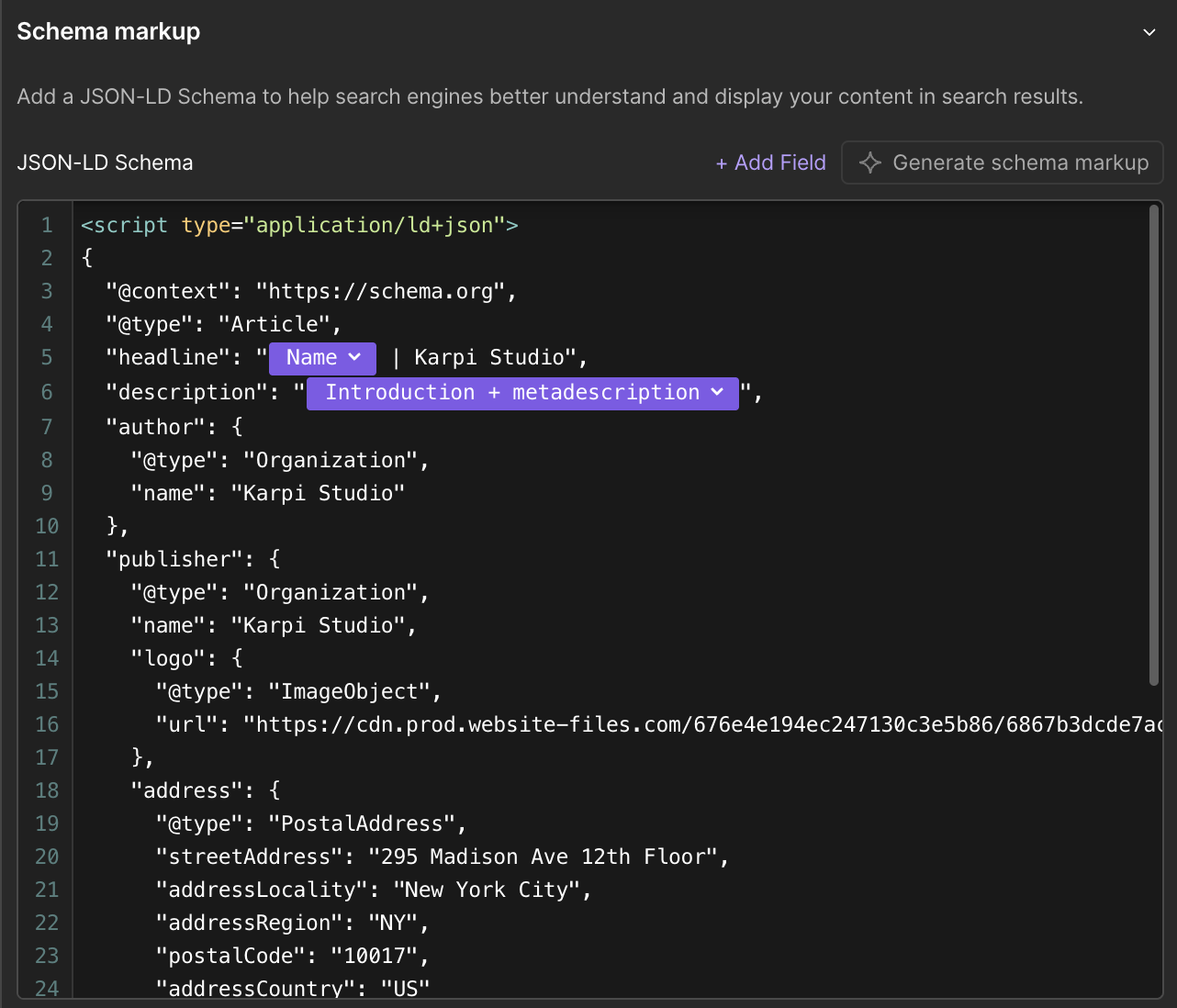
Workflow
- Identify the variable: precise data like "Author Name," "Publish Date," or "Product Description."
- Create the JSON Structure: Write the static JSON-LD script.
- Insert CMS Fields: Use the "Add Field" button in the custom code area to replace static text with dynamic Webflow variables.
Example concept: Instead of typing "author": "John Doe", you type "author": "{CMS Field: Author Name}".
Practical checklist for CMS mapping:
- Ensure your Date fields are formatted ISO 8601 (Webflow does this by default usually, but check your output).
- Clean your Plain Text summaries. If you map a Rich Text field to Schema, the HTML tags (like
<p>) will break the JSON code. Always create a separate "Summary (Plain Text)" field in your CMS for this purpose. - Map your "Main Image" to the
imageschema field to ensure AI visuals are accurate.
For more on structuring collections before you map them, see our guide on how Webflow CMS structure powers AEO.
Essential Schema types for B2B SaaS
For a B2B SaaS company, standard "BlogPosting" schema is not enough. You need to describe your product and your commercial content. Our schema glossary covers each type and property with JSON-LD examples and Webflow implementation notes.
1. SoftwareApplication Schema
This tells AI that your page describes a piece of software. It allows you to define the application category, operating system, and feature set.
- Use case: Your homepage or core "Product" page.
- Key properties:
applicationCategory,operatingSystem,featureList.
2. FAQ Page Schema
This is the single most effective schema for Webflow AEO. It directly feeds the "Question / Answer" format that chatbots use. For a complete breakdown of how FAQ schema works beyond dedicated FAQ pages, see our guide on using FAQPage markup on any Webflow page.
- Use case: Pricing pages, specific feature pages, or dedicated support articles.
- Webflow tip: Create a "Nested Collection" for FAQs inside your main Product Pages so you can dynamically generate this schema.
3. Tech Article Schema
If you write technical documentation or API guides, switch from BlogPosting to TechArticle.
- Use case: Developer docs, API references, integration tutorials.
- Benefit: It signals to the AI that this content is technical instruction, not just opinion.
Validating your data for retrieval
Writing the code is only half the battle. If your JSON syntax has a single misplaced comma, the entire block of code is ignored by the AI, which is why schema is the foundation of AEO and not a finishing touch.
The Validation Process
- Publish your Webflow site. Schema cannot be tested on the unhosted
.webflow.iosubdomain reliably if you have specific domain constraints, but generally, you need a live URL. - Use the Rich Results Test: Google's official tool will tell you if your Schema is syntactically correct.
- Check for "Drift": Ensure the content in your Schema matches the visible text on the page. If your Schema says the price is $50 but the page says $100, AI will flag your site as untrustworthy.
Common Webflow Validation Errors
- Unescaped Characters: If your CMS content contains quotes (
") or apostrophes, it can break the JSON code. - Fix: Use a simple JavaScript function or a dedicated Webflow tool to "stringify" your text fields before injecting them into Schema.
Do I need a developer to add Schema in Webflow?
Not necessarily. If you are comfortable with basic HTML/JSON syntax, you can do it yourself using Webflow's "Custom Code" blocks in the Page Settings. However, for complex nested schemas, a developer is recommended to ensure the syntax doesn't break.
Can I use AI to write my Schema code?
Yes. You can ask ChatGPT to "Write a JSON-LD SoftwareApplication schema for a B2B SaaS tool." Copy the output, and then carefully replace the static values with your Webflow CMS variables.
Does Schema guarantee I will appear in AI answers?
No guarantees exist in search. However, Schema significantly increases the probability of your content being understood and retrieved. It removes the ambiguity that often causes AI to skip over content.
What happens if I have multiple Schema types on one page?
This is allowed and often encouraged. For example, a product page might have SoftwareApplication schema to describe the tool, FAQPage schema for the questions section, and BreadcrumbList schema for navigation. You can nest them or list them separately in the graph.
Does Webflow natively support Schema?
Yes, Webflow AI natively generates advanced JSON-LD Schema based on your website content. However it is advisable to verify the code by expert.


.avif)